
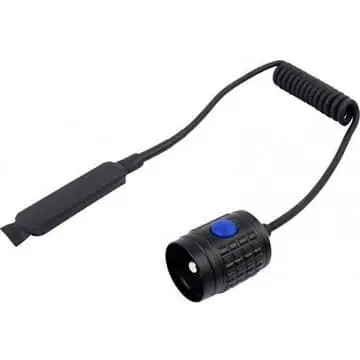
Olight Remote Pressure Switch – RM20S
R249
The Olight Remote Pressure Switch – RM20S for the M22 and M20SX-L2 MOMENTARILY activates whatever mode the light has been set to and is made to be used with any long gun – rifle or shotgun.
Fast delivery directly to your door!
- Satisfaction Guaranteed
- After Sales Service
- Secure checkout: Yoco or EFT
The Olight Remote Pressure Switch – RM20S for the M22 and M20SX-L2 MOMENTARILY activates whatever mode the light has been set to and is made to be used with any long gun – rifle or shotgun.
Information
The Olight Remote Pressure Switch – RM20S for the M22 and M20SX-L2 MOMENTARILY activates whatever mode the light has been set to and is made to be used with any long gun – rifle or shotgun (not for pump action weapons). There is no “click” sound when activated – only slight pressure is needed on the switch making it easy to use with gloves as well.
Made to be fit into the integrated pressure switch pocket of a fore grip, the pressure switch can also be attached with hook and loop tape (not supplied) to any weapon that does not have an integrated pressure switch pocket.
Choosing the correct remote switch
The model identity on this listing is Remote Pressure Switch – RM20S. Olight accessories can use similar connectors, diameters or mounting patterns while remaining model-specific, so match the complete model designation—not appearance alone—before ordering.
Before checkout, compare the product name with the model already in use and inspect the saved photographs for connector, mounting and finish details. If any part of the model designation differs, confirm compatibility before treating the item as interchangeable. Keep the model label and order record for future replacement checks. This is especially useful when the original light, mount or charging accessory is later replaced. Retain any supplied instructions so another user can identify the same configuration correctly.
Remote-switch setup
The Olight Remote Pressure Switch – RM20S lets a compatible light be operated from a remote control position. Confirm the exact light family and connector shown in the saved details, then route the lead so it cannot snag, stretch across a sharp edge or interfere with the equipment’s normal controls.
After fitting, test every supported switch function with the equipment unloaded and in a safe direction. Check that the connector remains fully seated and that normal movement does not pull on the cable. Recheck mounting and cable condition periodically.
Fit is model-specific
Olight remote switches with similar names may use different magnetic contacts, locking features or cable layouts. Use the complete switch code and compatible-light reference, not colour or general appearance, to select a replacement. Keep contacts dry and free from grit, and disconnect the switch before storage if the compatible product instructions require it.
Operate the original tail or body switch as a cross-check after installation. If the remote control behaves inconsistently, stop and inspect the connector, cable routing and compatible light before further use.
Related Olight products
Browse more Pressure Switches products or visit the Olight range. Use the exact compatibility information on each page when pairing products and accessories.
Only logged in customers who have purchased this product may leave a review.

Reviews
There are no reviews yet.